Learn Redis fundamentals, including installation, configuration, and master-replica replication on Ubuntu and RHEL Linux.
What Is Redis?
Redis is an in-memory key-value data store used for caching, messaging, and real-time analytics. It offers extremely low latency and supports optional persistence.
Redis Installation
Ubuntu
sudo apt update
sudo apt install redis-server -y
sudo systemctl enable redis-server
sudo systemctl start redis-server
RHEL / Rocky / Alma
sudo dnf install redis -y
sudo systemctl enable redis
sudo systemctl start redis
Verify:
redis-cli ping
Basic Configuration
Edit:
/etc/redis/redis.conf
Key settings:
bind 0.0.0.0
protected-mode yes
requirepass strongpassword
Restart Redis:
systemctl restart redis
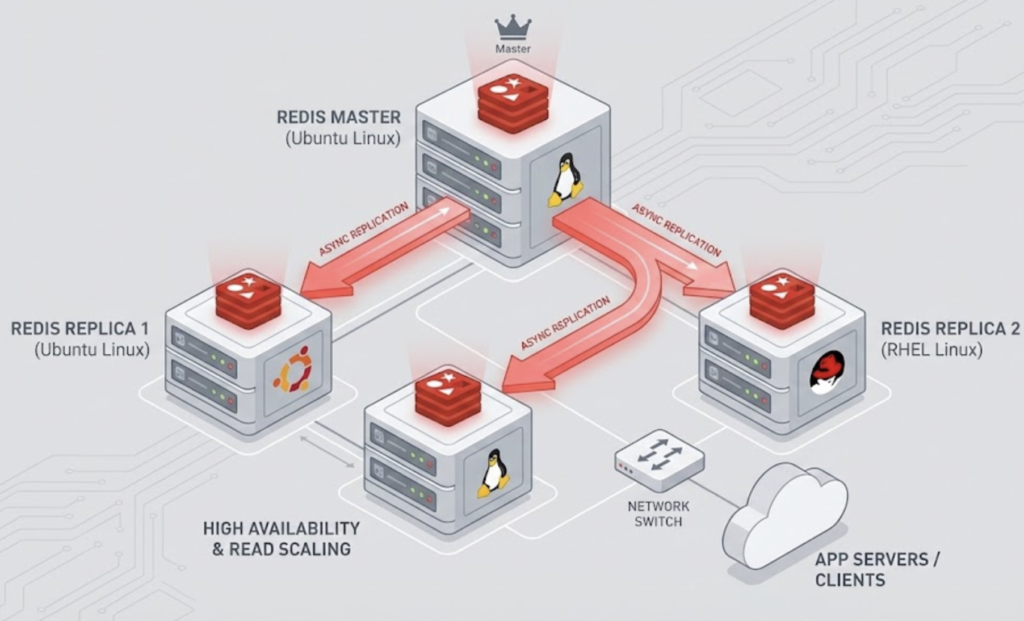
Redis Replication (Master–Replica)
Configure Replica Node
Edit redis.conf on replica:
replicaof <master-ip> 6379
masterauth strongpassword
Restart Redis:
systemctl restart redis
Verify Replication
redis-cli info replication
Persistence Options
- RDB snapshots – periodic backups
- AOF (Append Only File) – durable logging
Enable AOF:
appendonly yes
Best Practices
- Use Redis for hot data only
- Enable authentication
- Monitor memory usage
- Combine Redis with a durable database