Introduction to Linux
Linux is a free and open-source operating system kernel originally developed by Linus Torvalds in 1991. Today, Linux powers a wide range of systems including servers, cloud platforms, supercomputers, mobile devices (Android), and embedded systems.
Linux is known for:
- Stability and reliability
- Strong security model
- High performance
- Flexibility and customization
- Large community support
Linux is not a single operating system but a family of operating systems, called distributions (distros), built around the Linux kernel.
Linux Architecture Overview
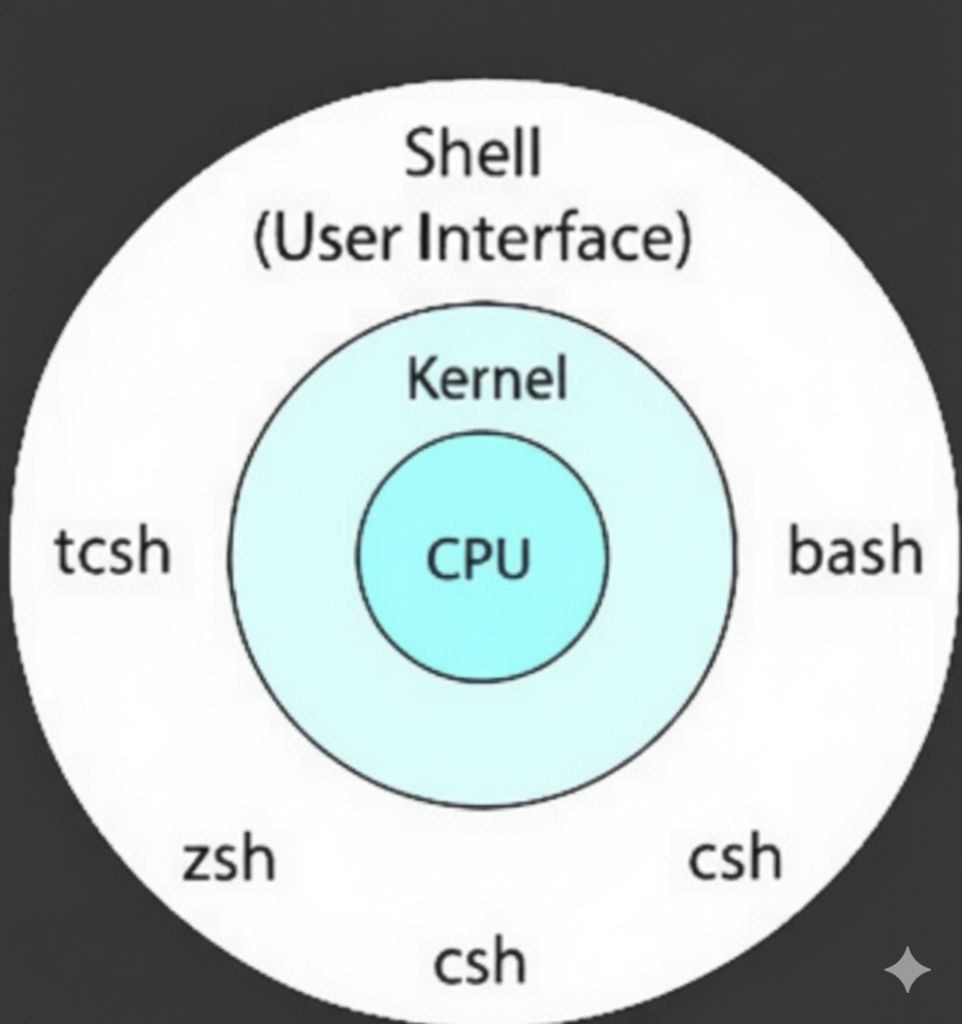
Linux follows a layered architecture:
1. Kernel
The kernel is the core of the Linux operating system. It acts as a bridge between hardware and software.
Key responsibilities of the kernel:
- Process management (CPU scheduling)
- Memory management
- Device management (drivers)
- File system management
- Networking
- Security and access control
Users do not interact with the kernel directly.
2. Shell
A shell is a command-line interface (CLI) that acts as an intermediary between the user and the Linux operating system. It allows users to interact with the system by typing commands, executing programs, managing files, and automating tasks through scripts.
When a user enters a command, the shell:
- Interprets the command
- Communicates with the Linux kernel
- Displays the output or result back to the user
In simple terms, the shell is the command interpreter that enables users to control the operating system efficiently.
Why Is the Shell Important?
The Linux shell is a fundamental tool for system administrators and developers because it:
- Provides direct control over the operating system
- Enables automation using shell scripts
- Allows remote system management via SSH
- Consumes fewer resources compared to graphical interfaces
- Offers powerful text processing and piping capabilities
Many server environments rely entirely on the shell without a graphical user interface (GUI).
Popular Linux Shells

Linux supports multiple shells, each with its own features and use cases.
1. Bash (Bourne Again Shell)
Bash is the most widely used Linux shell and the default shell on most Linux distributions.
Key Features:
- Command history and auto-completion
- Strong scripting capabilities
- Environment variable management
- Compatible with
shscripts
Common Use Case:
System administration, automation, and scripting
2. Sh (Bourne Shell)
The Bourne Shell (sh) is one of the earliest Unix shells and serves as the foundation for many modern shells.
Key Features:
- Lightweight and fast
- POSIX-compliant
- Minimal syntax
Common Use Case:
Portable shell scripting across different Unix/Linux systems
3. Zsh (Z Shell)
Zsh is an advanced shell that extends Bash functionality and focuses on user productivity.
Key Features:
- Powerful auto-completion
- Advanced globbing and theming
- Plugin support (Oh My Zsh)
- Highly customizable
Common Use Case:
Developers and power users who want an enhanced CLI experience
4. Fish (Friendly Interactive Shell)
Fish is designed to be user-friendly and interactive, especially for beginners.
Key Features:
- Syntax highlighting
- Smart command suggestions
- No complex configuration required
- User-friendly scripting syntax
Common Use Case:
Interactive command-line usage and learning Linux basics
Mastering Linux fundamentals and understanding the shell forms the foundation of effective system administration, empowering users to control, automate, and optimize Linux systems with confidence.